Leopard Glass-Mac OSX on Windows
Aug 20, 2008

Leopard Glass - Mac OSX on Windows
Include this pack
-------------------------------------
Leopard WB theme
Leopard Firefox Theme
Leopard StylerToolbar
Leopard Wallpapers
Fonts (Lucida Grande and Segoe UI)
Download:-
http://rapidshare.com/files/132776185/Leopard_Glass_CW.rar


Want to have video as your Deskto Background in 2000/XP!
Feb 12, 2008
Play videos on Desktop Background for windows 2000/XP
Use BSPlayer to play & loop videos .but by enabiling the Desktop Mode you can play the
videos in desktop background..
Go ahead grab a trail and give a try ...
Click here for adware supported shareware
Click here to download pro(19 M.B)..
credits to original uploader
Want to Create Your own videos..
If you are using Windows DreamScene to display animated wallpaper, here is what is involved in making your own:
Note that Windows DreamScene plays .MPEG or .WMV files. .WMV files use substantially more CPU to run but are much smaller in file size and encoders are more readily available for them. .MPEG is what I would recommend if you want.
The key to a good animated wallpaper for Windows DreamScene is that it's loopable.
The specifications that Stardock Design worked from via Microsoft were:
1) Loops should be between 8 and 16 seconds but not longer as file size becomes problematic.
2) File size should be at least 720P (think 1024x768) for a 4X3 or 1280X900 for 16x9
3) Find a good encoder. This is easier said then done because good encoders cost money. A lot of money.
But you can get a free one here:
http://www.microsoft.com/windows/windowsme...er/default.mspx
Other notes:
a) There are various tutorials on the net on how to render your own scenes using Maya, 3D Studio, or whatever.
b) There are also tools that will help you animate a static scene. I.e. a scene with water that gives it wave effects and such.
c) Strong recommendation: If you are serious about your work, use DreamMaker to turn your video into a .Dream file. The reasons for this are (1) You can insert your name and website into the file which is then displayed on the Windows wallpaper dialog and (2) Your creation will be much easier to find in searches -- .DREAM for wallpaper is a lot easier to find than .WMV for wallpaper.
Some available videos ...
You can get tools, content, etc. at http://dream.wincustomize.com


Maya To XAML Exporter
Dec 22, 2007
This plug-in allows designers to create compelling 3D user interfaces in Maya and export to XAML, the next generation application GUI markup language for windows and the web. Objects created in Maya can be used as hit targets, windows forms controls, and more. Because the objects are kept as vector data in the interface, the user can scale the entire application and keep the same look and feel. Look for future export features like animation, mesh optimization, xml formatting, and the ability to specify the WPF target type template for Maya objects.
Download here(FILE SIZE: 1087 KB)...
New Features in this Release
- Designer support in VS.NET
- Performance optimization
Existing Features
- Polygon reduction and optimization specific to XAML.
- Export support for lights, cameras, materials, instanced meshes, textures
- Transparency maps (must use PNG with alpha)
- Animation export. Basic animation is supported, see details below.
- Fixed error loading XAMLExport.mel (Export options dialog now opens)
- Memory leaks fixed
- Major performance fix in very large mesh exports
- Fixed memory consumption on large mesh exports
System Requirements
.NET Framework 3.0
Maya 6x, 7, or 8x
| Download the latest .NET Framework 3.0 CTP
|
Future Features
- Exact animation curve export.
- XAML Formatting.
- Baked Textures (export procedural textures as file textures).
- Add animations, materials, and other resources as resources, instead of directly adding into the "visual tree".
- Be able to specify if you want to copy files, for textures, to the output directory of the xaml file. This will also modify the path automatically and make the path relative.
- The information specified in the Place2DTexture Nodes should be exported too. At least some of the settings of the Place2DTexture Node have a representation in xaml for example Tile, Viewport attributes.
- Specify output template file for output formatted export
- Export video textures as video on mesh
- Export pattern brushes, for textures with fractals, gradients, etc.
- Instance object materials
- Mac OS X version
Known Issues
- Texture files will throw a System.Security.SecurityException if the xaml file and texture files are run from the browser. Try running from a vs.net project instead.
- Skinned meshes and nurbs are not supported.
- Rotation animation only works when Maya is in Quaternion animation mode. This is a limitation of the .NET Framework 3.0.
Installing Maya To XAML
- Extract the contents of the compressed file.
- Copy the correct version of the [MayaVersion]/MayaToXAML.mll file to your bin/plug-ins directory.
- Copy the scripts/ExportXAML.mel to your ( My Documents/maya/
/scripts ) directory. - Launch Maya > and go to the Window Menu > Settings/Preferences > Plug-in Manager...
- In the Plug-in Manager > Click loaded next to MayaToXAML.mll
Using Maya To XAML
- Open or create a new mesh file: File > New Scene or Open Scene...
Note: If your mesh is NURBS, you will need to convert it to polygons. To convert to polygons, go to the Modeling view and select the mesh. In the Edit NURBS menu, click the Rebuild Surface Options button icon. Choose the Polygons option, in the Output Geometry section and click Rebuild.
| To export the mesh data, go to the File menu and click the Export All Options icon. Choose the XAML file type.
Click the Export All button and enter the file name. Select xaml from the file type.
The following export options are functional:
Other options will be available in a future release |  |
Animation
The newly added support for animation export is not feature complete. There are some fundamental differences in how Maya and WPF handle animation and how Maya allows the user to customize the rotation technique. A future release will provide full support for spline based animation curves. A couple key differences and constraints in WPF prevent a clean conversion of Maya keyframe animation to WPF. Both WPF and Maya use cubic bezier curves for animation.
Difference #1:
Maya has the ability to use different rotation spaces based on the user's selection. Maya's default rotation space is Euler rotation, which can be changed to Synchronized Quaternion via a simple user preference setting. All though WPF provides basic abstraction of its core Quaternion rotations via Euler rotations, it always uses Quaternion rotations at the core of the framework. If you're not using animation, this is a non-issue, but if you plan on animating rotation, you must change the setting in Maya to use Quaternion rotations. Otherwise, the Euler rotations in Maya will allow you to rotate your objects more than 180 degrees, and WPF will only understand the first part of the rotation and SLERP the rest.
Difference #2:
Maya's keyframes have the same concept of the KeySpline property, found in WPF DoubleAnimationUsingKeyFrames, known as animation curve tangent controls in Maya. However, Maya does not place an upper or lower bounds constraint on the p1 and p2 control points (KeySpline X1,Y1 and X2,Y2).
WPF constrains the KeySpline values by placing an upper bounds of 1 and a lower bounds of 0 on the KeySpline property. The constraint means that animated values can not be interoplated to a value less than the start keyframe or greater than the end keyframe value. The developer's rationale behind this was purely ease-of-use. Users understand the values as ease-in and ease-out, which is easier understood as values between 0 and 1. I tend to side more on enabling the user.
Maya assumes the user has a better grasp on animation curves, and it allows you to modify the tangents so that values are affected outside the values of the specified key segment. Unfortunetaley, the only viable solution to converting the Maya animation curves to XAML animation curves, is to subdivide the Maya animation splines when a curve affected value is less than 0 or greater than 1, using a technique called de Casteljau's algorithm. For now, when you encounter this issue, you can split your curves in Maya's Graph Editor.
I hope to have more time to detail these issues and provide some special attention in future releases.
A test scene in Maya..
Exported into WPF..

Click here for more details...
Technorati Tags: xaml, maya
Softs:WinAMP Pro v5.35 Build 1305 + PLugins+Skin
Aug 23, 2007
WinAMP Pro v5.35 Build 1305
---WinAMP 5.x Pro + DRM Ripping Patch v1.04 -MaRKuS TH-DJM
Plugins
--Album List v2.06
--DFX Audio Enhancer v8.349 for WinAMP
--Nullsoft Musepack Decoder v1.0 Beta
--Monkeys Audio v3.9.9.0 WinAMP Plugin
--SAM Encoders DSP Plugin for Winamp v3.8.3
--WavPack Plugin v2.4 for WinAMP 3 & 5
--Winamp PowerPlayer II v2.40d
-- And the best WinAMP Skin MMD3.

Download:
http://rapidshare.com/files/50313609/WinAMP_5.35.1305_by_Cyclope.rar
No pass.
Powered by ScribeFire.
Windows Vista Ultimate 32-bit..
Jul 9, 2007
The most complete edition of Windows Vista—with the power, security, and mobility features that you need for work, and all of the entertainment features that you want for fun...
When you want to have it all, including the ability to shift smoothly between the worlds of play and productivity, there's Windows Vista Ultimate. You'll never have to worry about having the most advanced capabilities—they're all here. This edition of Windows Vista offers an advanced, business-focused infrastructure, mobile productivity, and a premium home digital entertainment experience, all in a single offering.
Specifically, Windows Vista Ultimate offers all of the features found in Windows Vista Home Premium, including Windows Media Center, Windows Movie Maker with high-definition support, and Windows DVD Maker. It also offers all of the features found in Windows Vista Business, including business networking, centralized management tools, and advanced system backup features. And Windows Vista Ultimate has all of the new security and data protection features that help take Windows Vista to a whole new level of dependability.
In addition, Windows Vista Ultimate includes support for all of the new mobility features in Windows Vista, including Windows Tablet and Touch Technology, Windows SideShow, Windows Mobility Center, and other new, advanced mobility features.
Exclusive to Windows Vista are Windows Ultimate Extras. These cutting-edge programs, innovative services, and unique publications provide a richer computing experience for Windows Vista Ultimate users. Windows Ultimate Extras currently available include:
* Windows Hold’em, a poker game for players of all skill levels
* Language packs for Windows multi-language interface, where users can install and use multiple languages on a single PC. Great for multi-lingual households or if you are learning a new language.
* Secure Online Key Backup, where Ultimate users can store their BitLocker recovery password and Encrypting File System certificate on Windows Marketplace’s Digital Locker website for access to the key anytime, anyplace, and from any computer that has an Internet connection
* BitLocker Drive Preparation Tool, an automated tool which removes the complexity of setting up your PC to use this exclusive data security feature.
More Windows Ultimate Extras coming soon
* Windows DreamScene, an Extra that enables you to use looped, full-motion video as your desktop wallpaper instead of a static image
Whenever a new Windows Ultimate Extra is ready for distribution by Microsoft, you will see the Ultimate Extra control panel inform you that there are new extras to download. Simply download and install the Extras and begin enjoying these exclusive software and services that give your Windows Vista experience an extra lift!
If you want a single PC that fulfills all of your work, travel, and entertainment needs, or if you simply want to be confident that you have the very best, Windows Vista Ultimate is the no-compromise edition for you.
Download:
http://rapidshare.com/files/34021435/Vista.Ultimate.uploaded.by.h0ly.lag.part01.rar
http://rapidshare.com/files/34032293/Vista.Ultimate.uploaded.by.h0ly.lag.part02.rar
http://rapidshare.com/files/34071241/Vista.Ultimate.uploaded.by.h0ly.lag.part03.rar
http://rapidshare.com/files/34113346/Vista.Ultimate.uploaded.by.h0ly.lag.part04.rar
http://rapidshare.com/files/34365974/Vista.Ultimate.uploaded.by.h0ly.lag.part05.rar
http://rapidshare.com/files/34372103/Vista.Ultimate.uploaded.by.h0ly.lag.part06.rar
http://rapidshare.com/files/34397156/Vista.Ultimate.uploaded.by.h0ly.lag.part07.rar
http://rapidshare.com/files/34337416/Vista.Ultimate.uploaded.by.h0ly.lag.part08.rar
http://rapidshare.com/files/34337554/Vista.Ultimate.uploaded.by.h0ly.lag.part09.rar
http://rapidshare.com/files/34337517/Vista.Ultimate.uploaded.by.h0ly.lag.part10.rar
http://rapidshare.com/files/34337473/Vista.Ultimate.uploaded.by.h0ly.lag.part11.rar
http://rapidshare.com/files/34337564/Vista.Ultimate.uploaded.by.h0ly.lag.part12.rar
http://rapidshare.com/files/34346446/Vista.Ultimate.uploaded.by.h0ly.lag.part13.rar
http://rapidshare.com/files/34523395/Vista.Ultimate.uploaded.by.h0ly.lag.part14.rar
http://rapidshare.com/files/34550716/Vista.Ultimate.uploaded.by.h0ly.lag.part15.rar
http://rapidshare.com/files/34562016/Vista.Ultimate.uploaded.by.h0ly.lag.part16.rar
http://rapidshare.com/files/34607410/Vista.Ultimate.uploaded.by.h0ly.lag.part17.rar
http://rapidshare.com/files/34653340/Vista.Ultimate.uploaded.by.h0ly.lag.part18.rar
http://rapidshare.com/files/34690678/Vista.Ultimate.uploaded.by.h0ly.lag.part19.rar
http://rapidshare.com/files/34724324/Vista.Ultimate.uploaded.by.h0ly.lag.part20.rar
http://rapidshare.com/files/34745980/Vista.Ultimate.uploaded.by.h0ly.lag.part21.rar
http://rapidshare.com/files/34755457/Vista.Ultimate.uploaded.by.h0ly.lag.part22.rar
http://rapidshare.com/files/34787579/Vista.Ultimate.uploaded.by.h0ly.lag.part23.rar
http://rapidshare.com/files/34798730/Vista.Ultimate.uploaded.by.h0ly.lag.part24.rar
http://rapidshare.com/files/34804825/Vista.Ultimate.uploaded.by.h0ly.lag.part25.rar
Crack
http://rapidshare.com/files/34862621/Vista.All.x86.OneClick.Activator-CLoNY.rar
Thnaks to the original uploader

Soft:Symantec Ghost Solution Suite v2.0..
Jun 19, 2007

Highlighted Features and Benefits
- Microsoft Windows Vista and 64-Bit OS Support
- Single Console for Management of all Migration Tasks
- Rapid and Reliable Multicast Deployment
http://rapidshare.com/files/26989394/Symantec_Ghost_Solution_Suite_v2.0--Rooni143.part1.rar
http://rapidshare.com/files/26989680/Symantec_Ghost_Solution_Suite_v2.0--Rooni143.part2.rar
http://rapidshare.com/files/26989933/Symantec_Ghost_Solution_Suite_v2.0--Rooni143.part3.rar
http://rapidshare.com/files/26990001/Symantec_Ghost_Solution_Suite_v2.0--Rooni143.part4.rar
Thanks to original uploader..
Technorati Tags: symantec, ghost, ghost solution suite, norton ghost
Software:Download DFX Audio Enhancer 8.350(full pack)..
Jun 16, 2007

- for Windows Media Player 9/10 -
- Winamp 2/5 -
- RealPlayer/ RealOne -
- Musicmatch Jukebox -
- J. River Media Center -
- Yahoo! Music Jukebox
Give your digital music files more vibrancy with DFX® Audio Enhancer! DFX enhances your music listening experience by improving the sound quality of MP3, Windows Media, Internet radio and other music files. With DFX you can transform the sound of your PC into that of an expensive stereo system placed in a perfectly designed listening environment. Renew stereo depth, boost your audio levels and produce a deep, rich bass sound.
http://www.afilehost.com/file/7608/-DFXaenh8350All-rar.html
http://rapidshare.com/files/37061733/_DFXaenh8350All.rar
Soft:Casio fx-9860 Emulater( Silent Install ..)
Jun 12, 2007

By this emulator you can solve complex equations , Matrices , Calculus , Sketch functions and etc..
Small Manual Included with the file..
Download Link
http://rapidshare.com/files/36471965/casio_fx9860_emulator_v1.03.rar
Size : 1.2 MB
Symantec Norton Ghost 12 BOOTABLE ISO Final Retail
Jun 11, 2007

Your PC drive now contains more than text files.
There are contacts, financial documents, pictures, and (valuable) Music and Video downloads.
They aren’t as safe as you think. A glitch may accidentally occur to corrupt and even delete your files.
That’s where Norton Ghost comes in. It helps you backup your precious Data automatically.
Prompt it or let it work in the background like a ghost - quietly protecting your files, transferring
them to backup drives, and even optimizing the performance of your PC’s drives.
There
may be a ghost of a chance that you’ll ever need Ghost 12 but it’s far
better to have Ghost fighting on your side. After all, your PC contains
key aspects of your life.
TESTED - 350 MB BOOTABLE ISO
http://rapidshare.com/files/29680906/GST12.part1.rar
http://rapidshare.com/files/29676976/GST12.part2.rar
http://rapidshare.com/files/29673891/GST12.part3.rar
http://rapidshare.com/files/29670637/GST12.part4.rar
Download Microsoft Virtual PC 2007
Jun 10, 2007

Use Microsoft Virtual PC 2007 to run multiple operating systems at the
same time on the same physical computer. Switch between virtual
machines with the click of a button. Use virtual machines to run legacy
applications, provide support, train users, and enhance quality
assurance.
Virtual PC lets you create separate virtual machines
on your Windows desktop, each of which virtualizes the hardware of a
complete physical computer. Use virtual machines to run operating
systems such as MS-DOS, Windows, and OS/2. You can run multiple
operating systems at once on a single physical computer and switch
between them as easily as switching applications—instantly, with a
mouse click. Virtual PC is perfect for any scenario in which you need
to support multiple operating systems, whether you use it for tech
support, legacy application support, training, or just for
consolidating physical computers.
http://rapidshare.com/files/35139937/Virtual_PC_2007__32-bit_.rar
Piky Basket 2.0 ...Copy>Copy>Copy>Paste !
Apr 20, 2007
Piky Basket 2.0

Conceptworld
 Conceptworld
Piky Basket is an extension to Windows Explorer. It comes with three special features. One, it allows you to select files/folders in to a "virtual basket" from different locations. Once you are done selecting, you can paste them all at once to the target folder. It can save lot of time and effort when organizing files/folders, taking backup or burning a CD. Two, with just two clicks you can copy file paths of the selected files to the clipboard. File paths are often required for documentation, e-mailing them to co-workers or for databases. Three, it allows you to launch Windows Command Prompt from any folder. The current directory in Windows Command Prompt automatically changes to the selected folder.
Piky Basket is integrated with Windows Explorer. You do not have to run Piky Basket as a separate program. It can be accessed from the menu, which appears by right clicking on any files/folders in Windows Explorer.
 Runs on Windows XP, Vista, 2003 Server, 2000, ME, 98, 95
Step 1: Selecting Files using Piky Basket | |
| |

Step 2: Copying Files using Piky Basket

Second Cool Feature: Copy Paths to Clipboard | |||||||||||||||||||||||||||||
 | |||||||||||||||||||||||||||||
|
With just 2 clicks, Piky Basket can get the file paths of the selected files/folders in Windows Explorer. If you are copying the file paths from a mapped network drive, Piky Basket will prompt you if the paths must be in Universal Naming Convention (UNC) format (eg. \\servername\sharename\foldername ). This is helpful when you want your coworkers to access the files/folders over the network. Click here to download Piky Basket. Its Free.
|


AudioShell - ID3 tag editor shell extension
Apr 19, 2007
 AudioShell
is a freeware MS Windows Explorer shell extension plug-in which allows
you to view and edit music tags directly in Windows Explorer. It is
support all files and tags standards supported by Tag&Rename.
AudioShell adds ID3 tag editor and viewer tabs to the music files
properties menu (you can edit ID3 tags file by file or in groups),
detailed music files hints with tag and file information, and
additional columns in the Explorer files list. Full Unicode support.
System requirements: AudioShell is designed for Windows 2000/XP and higher 32 bit systems.
Supported files and tags formats:- mp3 (all ID3 tag versions)
- wma, asf and wmv (including DRM protected files)
- Apple iTunes and iPod aac (m4a, m4b, m4v and m4p) and mp4 files
- ogg, flac (vorbis comment tags)
- mpc, mp+ (APE/APEv2 tags)
- monkey's audio (APE/APEv2 tags)
- wav pack (APE/APEv2 tags)
- optim frog (APE/APEv2 tags)
- wav (ID3v2 tag in 'tag ' RIFF chunk)
- Chinese Simplified
- Czech
- English
- French
- German
- Italian
- Polish
- Russian
- Spanish


The All-New Netscape Browser 8.1.3
Apr 3, 2007
Speed, Flexibility and More Security Choices Than Any Other Browser


Windows XP 3D Flip Effect
Mar 7, 2007
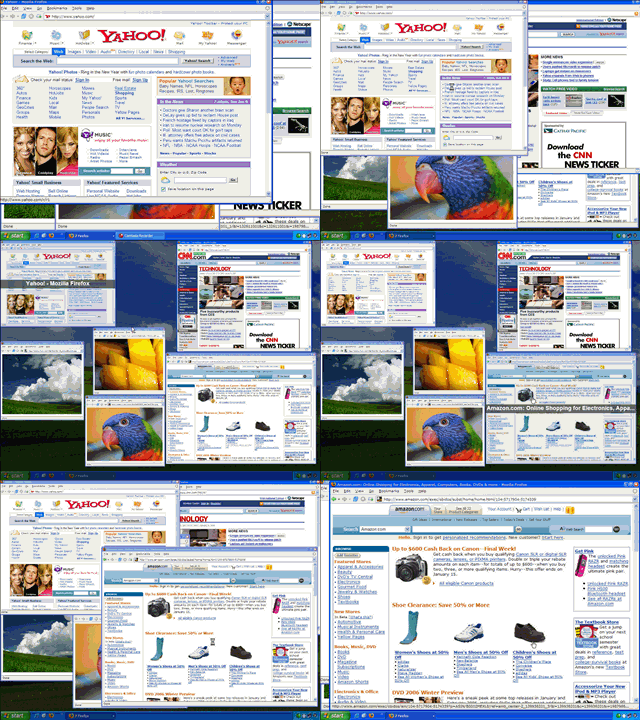
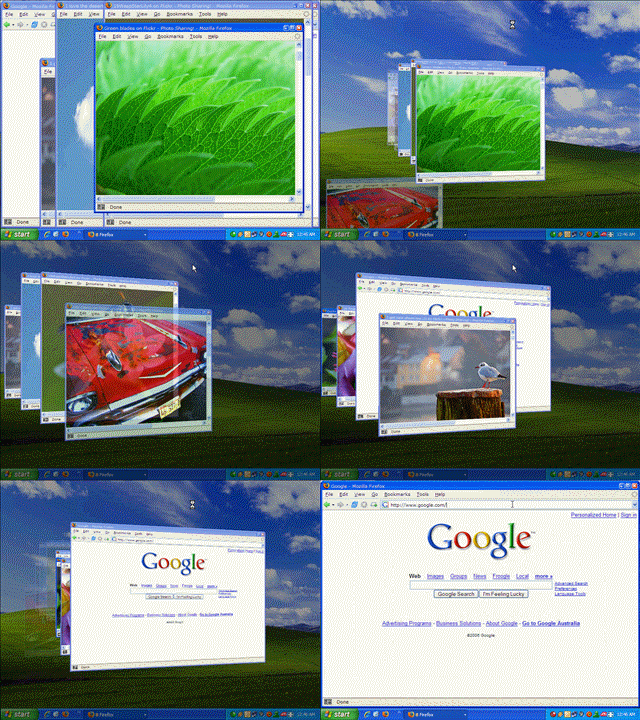 Features
* Displays thumbnails of all applications, including minimized applications, in 2D and 3D views.
* Shows thumbnails of all windows belonging to the current application.
* Hides all windows for quick access the desktop.
* While tiled, can display the title of the currently selected window or the titles of all tiled windows.
* Windows can be closed and minimized/restored while tiled.
* Completely configurable: Hot keys, mouse hotspots, floating buttons, window titles, and performance settings can all be changed.
* Supports multiple monitors.
MSOffice 2007 Enterprise Edition
Mar 6, 2007
Name: Microsoft Office Enterprise 2007
Media Type: Application
Approx Size: 495 Mb
What's included in Office Enterprise 2007
Access 2007
Communicator 2007
Excel 2007
Groove 2007
InfoPath 2007
OneNote 2007
Outlook 2007
PowerPoint 2007
Publisher 2007
Word 2007
updated link:

http://msft-dnl.digitalrivercontent.net/msoffice/pub/X12-30196/X12-30196.exe
Thats official from the M1cr0$0ft website.
You may have to create an account to download it but its free to register.
Once you download it run the installer and DO NOT put in a serial!!!!
just click next and then it will ask you if u wanna put in a serial and click no..
ok after you install it dont open it!
go to my computer>hard drive you installed it to>program files>common files>microsft shared>office12>office setup controller>proof.en
open the xml file in notepad and find this:
SetupControllerFiles
iTUNES 7 - Now Available!
Oct 4, 2006
The latest release of iTUNES 7 by Apple has the following features added..
- Movies
Buy Disney films from the iTunes Store and go to the movies without leaving your comfy chair.
-
Cover Flow
With Cover Flow, you can flip through your digital music and video collection just as you would CDs.
-
iPOD Games
Just $4.99 in the iTunes Store, iPod games give you hours of fun.
-
Download Manager
Make the most of your time by telling iTunes in what order to download content from the iTunes Store.
-
iPOD Summary
Get at-a-glance information about everything on your iPod.